
What is a DSE assessment?
Reviewing how you use display screen equipment
A Display Screen Equipment assessment looks at how a workstation is arranged and how the user interacts with it during normal work. It is not limited to the screen itself. A useful assessment considers the complete working setup and whether anything could contribute to discomfort or poor posture.
- Keyboard and mouse position
- Screen height, viewing distance, brightness and reflections
- Chair adjustment and back support
- Desk space and working position
- Lighting, temperature, noise and available space
- Rest breaks and changes of activity
- Eyesight and visual comfort
- Software usability and training
- Any aches, pain, numbness, headaches or eye strain
The aim is to identify areas that may need adjustment and help the user take practical action before poor workstation habits become established.
Why DSE assessment matters for modern working
Office, home and hybrid work all need suitable workstation arrangements
Working patterns have changed significantly. Many employees now move between an office workstation, home working environment and other locations during the same week. Laptop use has also increased, making it especially important to consider screen height, separate keyboards or pointing devices, seating and general working posture.
The free iProtectU assessment is suitable for office workers, home workers, hybrid workers, contractors, freelancers and anyone who regularly uses display screen equipment as part of their work.
A DSE review should reflect the way someone actually works rather than assume that every employee sits at the same permanent office desk each day.
Free IIRSM certified DSE awareness training
Understand the key points before assessing your workstation
The free resource starts with a short DSE awareness training video. It explains the main points users should consider when setting up and using display screen equipment so they can make more informed decisions during the assessment.
- Maintaining a comfortable working posture
- Positioning screens at a suitable height and viewing distance
- Using keyboards and pointing devices without unnecessary stretching
- Adjusting chairs to support the back and arms
- Taking regular breaks or changing activity
- Considering eyesight and visual comfort
- Managing lighting, reflections and the wider working environment
Once the training is complete, the user can move directly into the online DSE self-assessment.
Complete the online DSE self-assessment
A structured review of the complete workstation
The online assessment guides the user through each part of their setup. Questions are supported by practical prompts so that where something needs review, the user can understand the type of adjustment that may help.
The assessment covers rest breaks and eye examinations, keyboards, posture, mouse and pointing devices, screens, software, furniture, chair adjustment, the working environment and any discomfort experienced during DSE work.
Once submitted, the information is used to create the user’s PDF DSE assessment report and training certificate. The free resource is based on the DSE assessment used within the iProtectU health and safety software platform.

Receive your DSE report and training certificate
A useful record of your assessment and learning
After the assessment is submitted, users receive a PDF DSE assessment report and an IIRSM certified DSE awareness training certificate by email. This provides a clear record of the workstation review and the training completed.
Importantly, the free DSE form is designed as a practical resource rather than a marketing sign-up. The name and email address entered are used to send the completed assessment report and certificate, and users are not added to marketing emails from the form.
For individuals, this makes it a straightforward way to review a workstation and refresh DSE awareness without needing to purchase software.
From one assessment to organisation-wide DSE management
Managing DSE at scale requires visibility and follow-up
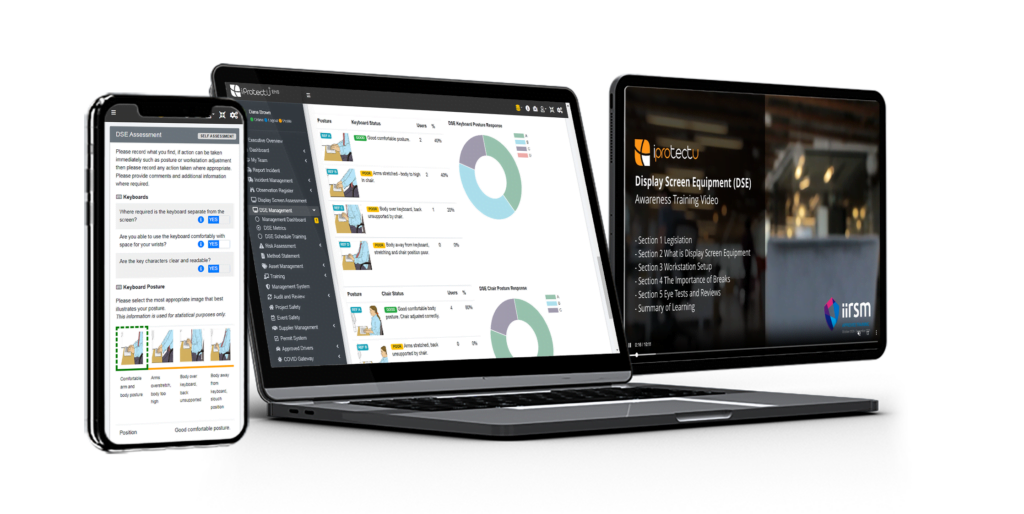
Completing one DSE assessment is relatively simple. The challenge for employers is managing assessments across hundreds or thousands of people, particularly where teams work across offices, homes and multiple locations.
Health and safety teams may need visibility of who requires an assessment, which assessments are complete, where issues have been identified, actions requiring follow-up, training completion and when reassessment is due.
The iProtectU DSE software brings these activities into the wider iProtectU EHS and QHSE platform so organisations can manage DSE records, training and follow-up more consistently rather than relying on disconnected forms, spreadsheets and email records.
Try the free DSE assessment today
Check your workstation and receive your certificate
If you regularly use display screen equipment, the free iProtectU resource provides a quick and practical way to review your workstation and refresh your DSE awareness.
Watch the training, complete the assessment and receive your PDF DSE assessment report and IIRSM certified training certificate by email.
Need to manage DSE across your organisation?
See how iProtectU can help you manage DSE assessments, training and follow-up as part of a connected health and safety management platform.